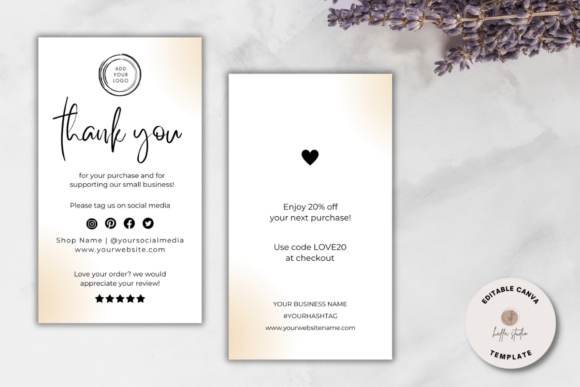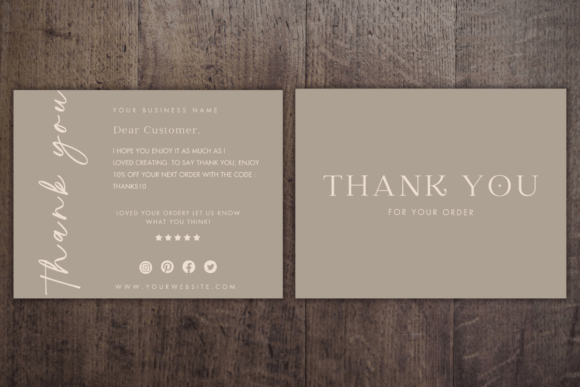
Canva Editable Thank You Card Template
Sending a handwritten note in a digital age is a powerful gesture, but finding the time and design skills to create professional-looking stationery can be daunting. This is where a Canva Editable Thank You Card Template bridges the gap between convenience and personal touch. Whether you are a small business owner sending orders to customers, an educator acknowledging volunteer work, or simply someone who values heartfelt communication, having a customizable digital asset saves hours of frustration.
However, before you click "buy," it is crucial to understand exactly what you are purchasing. The most common point of confusion—and the primary source of buyer dissatisfaction—is the nature of the product itself. Misunderstanding this can lead to wasted money and unnecessary stress. Let’s clarify how this tool works, what to expect, and how to avoid the pitfalls that trip up many first-time users.
Understanding the Digital Nature of the Product
The most critical detail to grasp immediately is this: This is a digital item. No printed item will be shipped to your home.
Many consumers, accustomed to traditional e-commerce experiences, instinctively look for tracking numbers or physical shipping estimates. When they realize the package contains no physical card, they often feel misled. To prevent this disappointment, always remember that you are buying a license to use a design file, not a tangible object. You receive access to the template so you can create the physical cards yourself.
This model offers significant advantages. It eliminates shipping costs, reduces environmental waste from packaging, and allows for infinite revisions until the design is perfect. However, it requires a shift in mindset. You are the printer. You are the designer. And with the right tools, you can achieve results that rival high-end stationery shops.
What Exactly Do You Receive?
After purchase, you will typically receive a .zip file containing a PDF link. Inside that PDF is a direct link to the template on Canva. It does not contain the editable file directly (like a .canva file) because Canva’s ecosystem requires you to edit within their platform. Here is what is included:
- A 5.5 × 4.25 inches standard greeting card size template.
- Full editing capabilities via Canva’s free online editor.
- The ability to resize the design for various formats, such as social media posts or smaller tags.
Because the template is hosted on Canva, you do not need to install any heavy software like Adobe Photoshop or Illustrator. All you need is a free Canva account and a basic web browser. This accessibility makes it ideal for beginners who may feel intimidated by complex design software.
Common Mistakes and How to Avoid Them
While the process is straightforward, several common errors can ruin the final output. By anticipating these issues, you ensure your thank-you cards look polished and professional.
Mistake 1: Ignoring Print Settings and Resolution
Digital screens display color using RGB (Red, Green, Blue), while printers use CMYK (Cyan, Magenta, Yellow, Key/Black). If you design on a backlit screen and print at home without adjusting settings, your vibrant blues might turn muddy or dark gray upon printing. Furthermore, downloading low-resolution images for your photos can result in pixelated, blurry prints.
The Fix: When designing in Canva, try to use high-quality images (at least 300 DPI if possible). When you are ready to print, select the "Print" option carefully. If printing at home, choose the highest quality setting on your printer driver. If using a professional service, check if they require specific file formats; usually, downloading as a "PDF Print" option provides the best balance of quality and compatibility.
Mistake 2: Assuming "Free" Means No Costs
Canva has a robust free tier, but it also features "Pro" elements—specific fonts, premium photos, or stickers—that carry a watermark or require a subscription. A common mistake is designing a beautiful card only to discover that key elements are locked behind a paywall when you try to download or share.
The Fix: Before finalizing your design, filter your search for "Free" elements only. Alternatively, if you already have a Canva Pro subscription, ensure you are logged into that account. If you are using the free version, stick to the free assets provided in the template. Most high-quality templates are designed with free elements to ensure accessibility for all users.
Mistake 3: Overlooking Paper Choice
Since you are handling the printing, the paper stock defines the perceived value of your message. Printing a sleek, modern business thank-you card on thin, flimsy copy paper sends the wrong message. Conversely, using overly thick cardstock in a standard home inkjet printer can cause jams or smudging.
The Fix: For home printing, medium-weight cardstock (around 65-80 lb cover weight) is usually the sweet spot. It feeds through most consumer printers smoothly while feeling substantial. If you are sending these for a wedding or a major corporate event, consider outsourcing to a local print shop or an online service like Vistaprint. They offer specialized finishes like matte, gloss, or linen textures that elevate the design significantly.
How to Execute the Process Smoothly
To get the best results from your Canva Editable Thank You Card Template, follow this streamlined workflow:
- Access the Template: Click the link from your purchase confirmation email. Log in to your Canva account (or create a free one).
- Customize Content: Replace placeholder text with your personalized message. Keep it concise. A simple "Thank you for your order!" or "We appreciate your support" paired with your brand name is often more effective than a lengthy paragraph.
- Adjust Visuals: Swap out stock images for your own product photos or logo. Ensure contrast is sufficient so text remains readable against the background.
- Proofread: Typos on a thank-you card can undermine the sentiment. Double-check names, dates, and spelling.
- Download Correctly: Click "Share" > "Download." Choose "PDF Print" for the highest quality if you plan to print professionally, or "PDF Standard" for quick home printing.
Printing Options: Home vs. Professional
You have flexibility in how you bring your design to life. Printing at home is cost-effective for small batches and offers immediate gratification. Stores like Staples or Office Depot also provide self-service kiosks where you can upload your PDF and print on higher-quality paper than typical home printers allow.
For larger volumes or special occasions, online services like Vistaprint or local print shops offer superior finishing options. They can bind cards, add envelopes, or apply foil stamping. While this incurs a higher per-unit cost, it ensures consistency and a premium feel that justifies the expense for important communications.
Final Thoughts on Usability
The beauty of this template lies in its simplicity and adaptability. It is not just a static image; it is a functional tool that respects your time and budget. By understanding that it is a digital product, avoiding technical pitfalls regarding resolution and paper, and choosing the right printing method, you can produce thank-you notes that leave a lasting positive impression.
Remember, the goal is connection, not perfection. A sincere message, delivered cleanly and promptly, is far more valuable than a delayed, overly complicated design. Use this Canva Editable Thank You Card Template to streamline your gratitude, allowing you to focus on what truly matters: your relationships with your customers, friends, and community.