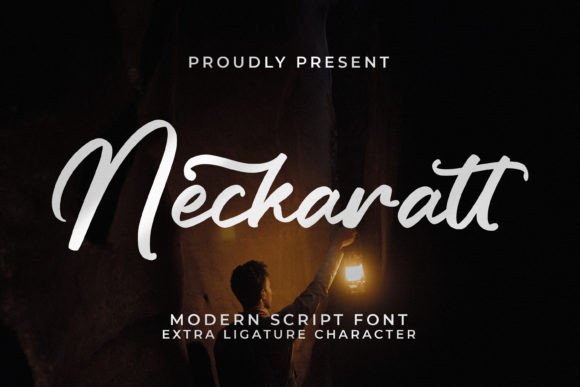
Neckaratt
Choosing the right typeface is rarely just about picking something that looks "pretty." For designers, branding specialists, and small business owners, typography is a silent salesperson. It communicates tone, quality, and intent before a single word of copy is read. This is where Neckaratt enters the conversation as a compelling option for those seeking a premium Modern Script aesthetic. It is not merely a decorative font; it is a strategic tool designed to elevate projects ranging from luxury packaging to personal branding.
However, the allure of script fonts often leads to common pitfalls. Many creators assume that because a font looks elegant in isolation, it will automatically enhance their design. The reality is more nuanced. Understanding the specific technical and aesthetic characteristics of Neckaratt—particularly its PUA encoding and ligature support—is essential to leveraging its full potential without compromising readability or professional polish.
Understanding the Premium Script Aesthetic
Modern Script fonts like Neckaratt bridge the gap between traditional calligraphy and contemporary minimalism. Unlike ornate Victorian scripts that can feel heavy or dated, modern scripts emphasize fluidity, clean lines, and a sense of effortless movement. This makes them incredibly versatile. You might encounter this font used effectively in:
- Branding Projects: Logos for boutique hotels, wedding planners, or high-end beauty brands.
- Product Packaging: Labels for artisanal soaps, organic skincare, or craft beverages.
- Marketing Materials: Posters, invitation cards, and greeting cards that require a touch of sophistication.
- Digital Content: Watermarks for photographers or overlays for social media quotes.
The key advantage here is versatility. Because Neckaratt is classified as a "Modern" script, it avoids the excessive flourishes that can make text illegible at smaller sizes. This allows it to function well on mugs, t-shirts, and shopping bags where space is limited but impact needs to be high.
The Critical Role of PUA Encoding
One of the most significant technical features of Neckaratt is that it is PUA encoded. For beginners, this term might sound intimidating, but understanding it is crucial for avoiding frustration later in your workflow. PUA stands for Private Use Area. In standard Unicode fonts, characters are mapped to fixed code points. However, complex script fonts with hundreds of alternate glyphs, swashes, and ligatures often exceed these standard limits.
When a font is PUA encoded, all those special characters are stored in a custom section of the font file. This means you cannot simply type "a-b-c" and expect to see the connected ligature unless your software supports direct input of those specific glyphs. Instead, you must access them through the Glyph Panel or Character Map in applications like Adobe Illustrator, Photoshop, or InDesign.
Mistake Alert: A common error occurs when users try to type directly into a text box expecting automatic ligatures. If you do not have OpenType features fully enabled or if you are using basic text tools that do not interpret the PUA codes correctly, you may end up with disjointed letters or missing characters. To avoid this, always ensure you are working within professional design software that supports advanced glyph selection.
Navigating Ligatures and Swashes Correctly
Ligatures are the backbone of any good script font. They connect letters smoothly, mimicking the flow of handwriting. Neckaratt offers an array of these connections, allowing words to look cohesive rather than choppy. However, not every combination works. Using a default ligature where a disconnected letter is stylistically better can ruin the balance of a logo.
To use these features effectively:
- Open the Glyph Panel: In Adobe apps, go to Window > Type > Glyphs.
- Browse Alternates: Look for the swash variants. These are the exaggerated endings on letters like 'f', 'y', or 'g' that add flair.
- Test Combinations: Do not rely on auto-kerning alone. Script fonts often require manual adjustment. Zoom in and check the spacing between the tail of one letter and the head of the next.
By manually selecting the correct ligatures, you ensure that the font behaves exactly as intended by the designer, resulting in a polished, professional finish.
Common Mistakes in Application
Even with a beautiful font like Neckaratt, execution matters. Here are practical areas where users often stumble, affecting the overall quality of their project.
Overusing Decorative Elements
It is tempting to use every swash and alternate available. However, less is often more. If you are designing a business card or a book cover, using too many elaborate swashes can make the text difficult to scan. Reserve the most dramatic ligatures for headlines or short phrases. For body text or secondary information, stick to the standard glyphs. This contrast creates visual hierarchy and guides the viewer’s eye.
Ignores Color Contrast
Script fonts have varying stroke widths. Thin parts of the letters can disappear against busy backgrounds or low-contrast colors. When applying Neckaratt to product packaging or posters, always test your color choices. A light gray script on a white background may look subtle and elegant in a mockup, but it will likely fail in print or on mobile screens. Ensure there is sufficient contrast to maintain legibility.
Scaling Without Adjusting Weight
When scaling Neckaratt down for small items like tags or labels, the intricate details of the script can become muddy. Conversely, scaling it up too large without adjusting kerning can create awkward gaps between letters. Always preview your design at 100% scale before finalizing. If the text becomes illegible at a certain size, consider simplifying the layout or choosing a different font for that specific element.
Evaluating Neckaratt for Your Specific Needs
Before purchasing or downloading Neckaratt, ask yourself a few critical questions. Is this font appropriate for the tone of your brand? If you are running a tech startup or a medical clinic, a flowing script might clash with the desired message of precision and reliability. Neckaratt shines in industries that value tradition, elegance, and personal touch—such as weddings, fashion, food and beverage, and arts.
Additionally, verify the licensing terms. Since Neckaratt is a premium font, ensure that your usage falls within the permitted scope. Personal use licenses differ significantly from commercial licenses for merchandise or digital products. Failing to secure the correct license can lead to legal issues and unexpected costs down the line.
Conclusion
Neckaratt is more than just a pretty font; it is a sophisticated design asset that requires thoughtful handling. By understanding its PUA encoding, mastering the selection of ligatures, and avoiding common application errors, you can harness its power to create designs that truly stand out. Whether you are a seasoned graphic designer or a small business owner creating your first logo, taking the time to learn how to work with this font will pay off in the quality and professionalism of your final output. Remember, great typography is not just about choice—it is about control.